


MCP servers in construction: what they can read, who controls it, and where your data goes
Construction software vendors started shipping MCP connectors this year.
Most of the writing about them explains what is technically possible. Almost none of it answers the four questions your IT director will ask in the first meeting. Here are those answers, and what MCP actually changes for the person letting packages on Monday morning.
An MCP server is a standard connector that lets an AI assistant read data out of a system you already use
MCP stands for Model Context Protocol. An MCP server is a piece of software that sits in front of a system, describes what is inside it in a way an AI assistant can understand, and hands over data when asked. Anthropic published MCP as an open standard in November 2024. In December 2025 it moved to the Agentic AI Foundation under the Linux Foundation, co-founded by Anthropic, OpenAI, and Block, with Google, Microsoft, AWS, and Cloudflare among its platinum members.
That governance detail matters more than it sounds. MCP is not one vendor’s file format that dies when they lose interest. It is the standard Anthropic, OpenAI, Google, and Microsoft have all signed up to, which is roughly as close to settled as this industry gets.
In plain terms: if your procurement software has an MCP server, you can ask Claude, ChatGPT, or Microsoft Copilot a question about your live project data and get an answer, without anyone writing code first.
MCP replaces one-off integrations with one protocol every assistant already speaks
The old way to connect two systems was an API and a developer. Each connection was built once, for one pair of systems, and somebody maintained it forever. Ten systems and five assistants meant 50 integrations, which is why most contractors have two or three and gave up.
MCP inverts that. The software vendor builds one server. Every assistant that speaks MCP can use it. Autodesk’s published explanation puts it as ‘an API for a large language model to discover and connect to data sources and tools’, and discover is the operative word. The assistant works out what is available and what it can ask for, rather than being told in advance by a developer.
The practical difference for a commercial team: you stop waiting for the integration roadmap. If the vendor has shipped an MCP server, the connection is a settings screen, not a project.
A read-only MCP server cannot change anything in the system it connects to
This is the first question worth asking any vendor, and the answers differ.
An MCP server can be built to read, to write, or both. A read-only server can retrieve and report. It cannot award a package, approve a variation, change a contract sum, send anything to a subbie, or delete a record. Nothing it does appears in your system as a change, because it does not make changes.
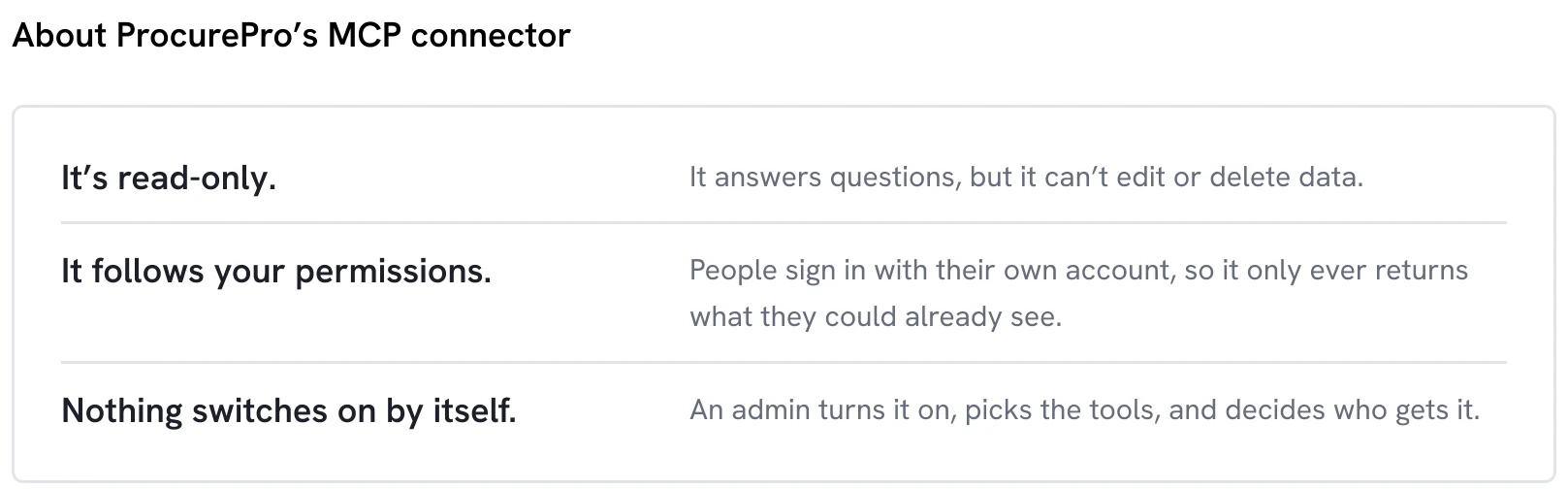
ProcurePro’s MCP connector is read-only by design, for the obvious reason that nobody wants an assistant that can hallucinate and also has signing authority.
Not every server is. Revizto’s construction MCP server reads issues, clashes, and model properties, and can also write to issues, which is a sensible call for coordination data and a different conversation entirely for commercial data.
So ask explicitly, because ‘AI integration’ covers both. A write-capable server is not automatically wrong. It is a different governance conversation and it needs a different approval.
An MCP server inherits the permissions the person already has, rather than creating new ones
Here is the part almost nobody writes about, and the part that decides whether this gets approved.
A properly built MCP server does not hold its own master key to your data. It authenticates as the person asking, and it returns exactly what that person could already see by logging in and clicking around. A QS who can only see three projects gets answers about three projects. A commercial director who can see the portfolio gets the portfolio.
With ProcurePro’s MCP connector, people sign in with their own ProcurePro account, so access is governed entirely by ProcurePro’s existing permissions and follows whatever project access and role each person already has. It never returns data someone could not already find themselves in the system. If someone leaves and their access is revoked, their assistant loses access at the same moment, because it was never separate access in the first place.
That last line is the one to take into the IT meeting. It does not create a new door into the data. It puts a different handle on the existing one.
Most MCP servers shipping in construction read design and coordination data, not commercial data
Worth being specific about what actually exists as at September 2026, because the marketing is ahead of the market.
Autodesk has shipped MCP servers for its product help content and for Fusion, plus a Revit server currently released as a tech preview. Revizto launched one in July 2026 covering issues, clashes, and model and object properties. Microsoft’s Work IQ servers reach documents in SharePoint, though they remain in preview and need a Microsoft 365 Copilot licence. Autodesk has said MCP servers for Autodesk Construction Cloud are coming.
All of it is real and all of it is useful. All of it is also about the model, the drawings, the clashes, and the files.
Notice what is missing. None of it reads structured commercial data: what the package was let for, who else bid, how far the accepted quote sat above budget, or what was actually agreed in the contract. The design side of the stack has been connected first because that is where the software has been longest. The commercial side is where the money is.
Procurement is the only construction process where the data is a decision rather than a record
Most systems in a contractor’s stack produce evidence. The model records what was designed. The site diary records what happened. The defects log records what went wrong. The document register records what was issued and when. All of it is a record of something that already occurred, and all of it is genuinely valuable to an AI assistant that can read across it.
Procurement is different. Every procurement action is a decision: this scope, these tenderers, this price, this subbie, these terms. The record is the decision. Which means the data coming out of a procurement platform is not a log of past events, it is the reasoning behind where the margin went.
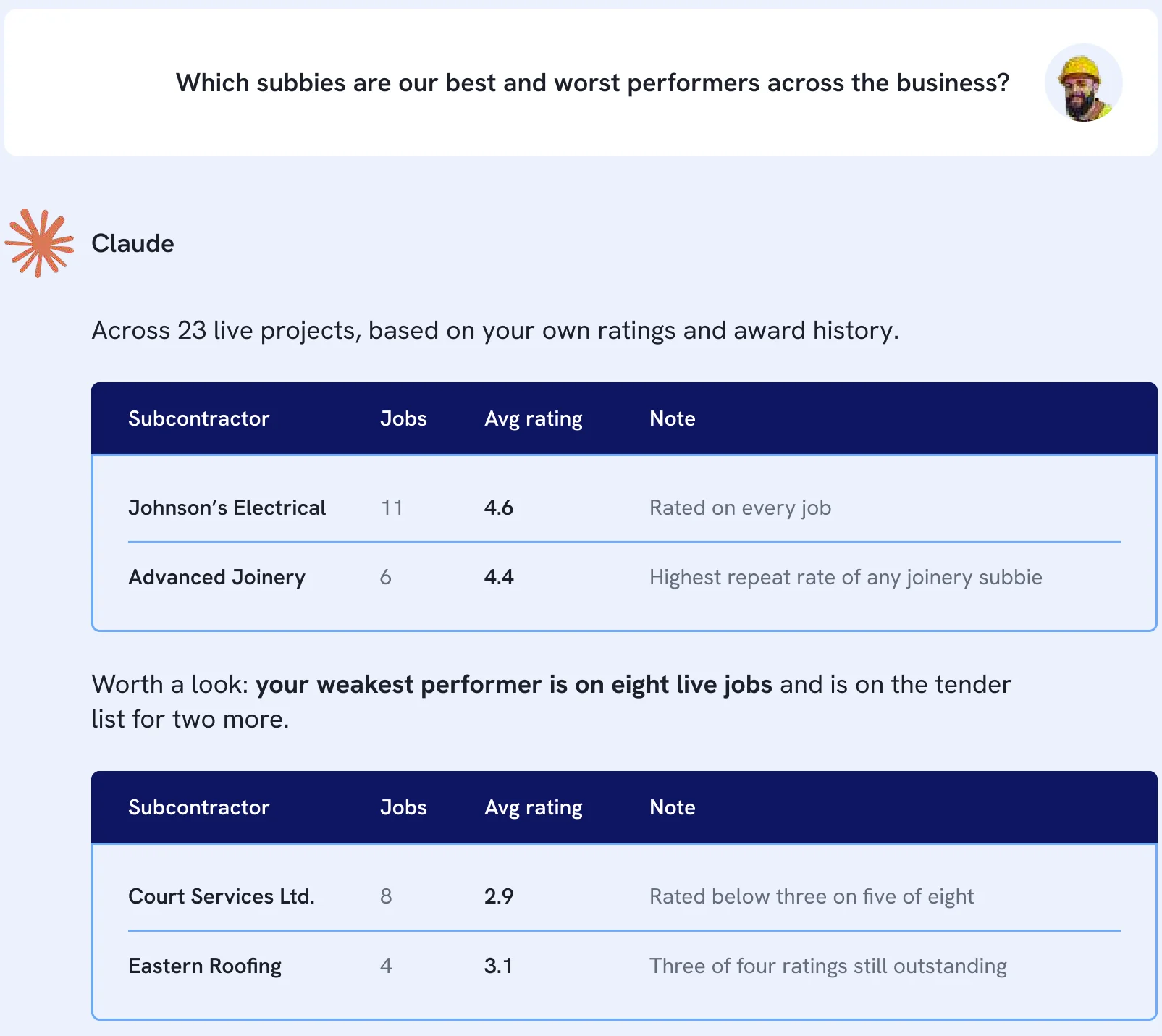
That is why connecting commercial data changes the questions you can ask. ‘Which packages are running over budget’ is a reporting question. ‘Which of our subbies consistently come in under budget on fitout, and which ones we keep using anyway’ is a commercial one, and it needs the decisions, not the records. This is the same argument as visibility preventing budget blowouts, one layer further down.
Nothing about MCP fixes procurement data that lives in 12 spreadsheets
The uncomfortable bit. An MCP server reads what is in the system. If your procurement lives across a shared drive, a dozen tender trackers, four inboxes, and one QS who knows where everything is, an assistant connected to that has nothing to read.
This is the real barrier to AI in construction procurement, and it is not the AI. It is that the data was never in one place to begin with. Contractors who have run procurement in a single platform have spent years building the thing that makes this work. Every package let, every quote received, every award, every contract, all captured in the same structure, across every project.
More than 300 head contractors run procurement on ProcurePro, across 6,000+ projects worth over $150 billion. That is not an AI achievement. It is the groundwork that makes the AI worth connecting. For the wider picture on where AI is useful on site, see our complete guide to AI in construction.
Getting the data in order comes first. It always did. MCP just made the payoff obvious.
ProcurePro’s MCP connector answers procurement questions in the assistant your team already uses
Connect it once, and your commercial team can ask questions in plain language and get answers from live procurement data across every project they have access to.
It works with Claude, Microsoft Copilot, and ChatGPT, with Google Gemini to follow.
Not ‘run a report and export it’. Ask, in whichever of those your business already runs, which packages are sitting with an approver, which tenders close this week, which trades have been let above budget, and get the answer with the underlying records behind it.
For the QS or CA, that is the Monday morning status chase compressed into one question. For the head of commercial, it is portfolio visibility without waiting for someone to assemble it. For the MD or CFO, it is the same procurement data everyone else is looking at, which is the point. It sits alongside the reporting already in ProcurePro rather than replacing it.
ProcurePro’s MCP connector is read-only, follows existing ProcurePro permissions, and is enabled by an administrator.
Four answers to have ready before you take an MCP server to IT
Whoever owns security at your business will ask some version of these. Get them from the vendor in writing.
- Can it write? Read-only or read and write. If it can write, what exactly can it change, and what cannot be undone.
- Whose permissions does it use? Its own service account, or the permissions of the person asking. The second is what you want.
- Who turns it on? An administrator for the business, or any team member with a login. Administrator-gated is what you want.
- Where does the data go, and is it trained on? Which assistant providers are supported, what leaves your tenancy, and whether any of it is retained for model training.
A vendor who cannot answer these quickly has not thought about them, which is itself the answer.
Where to go next
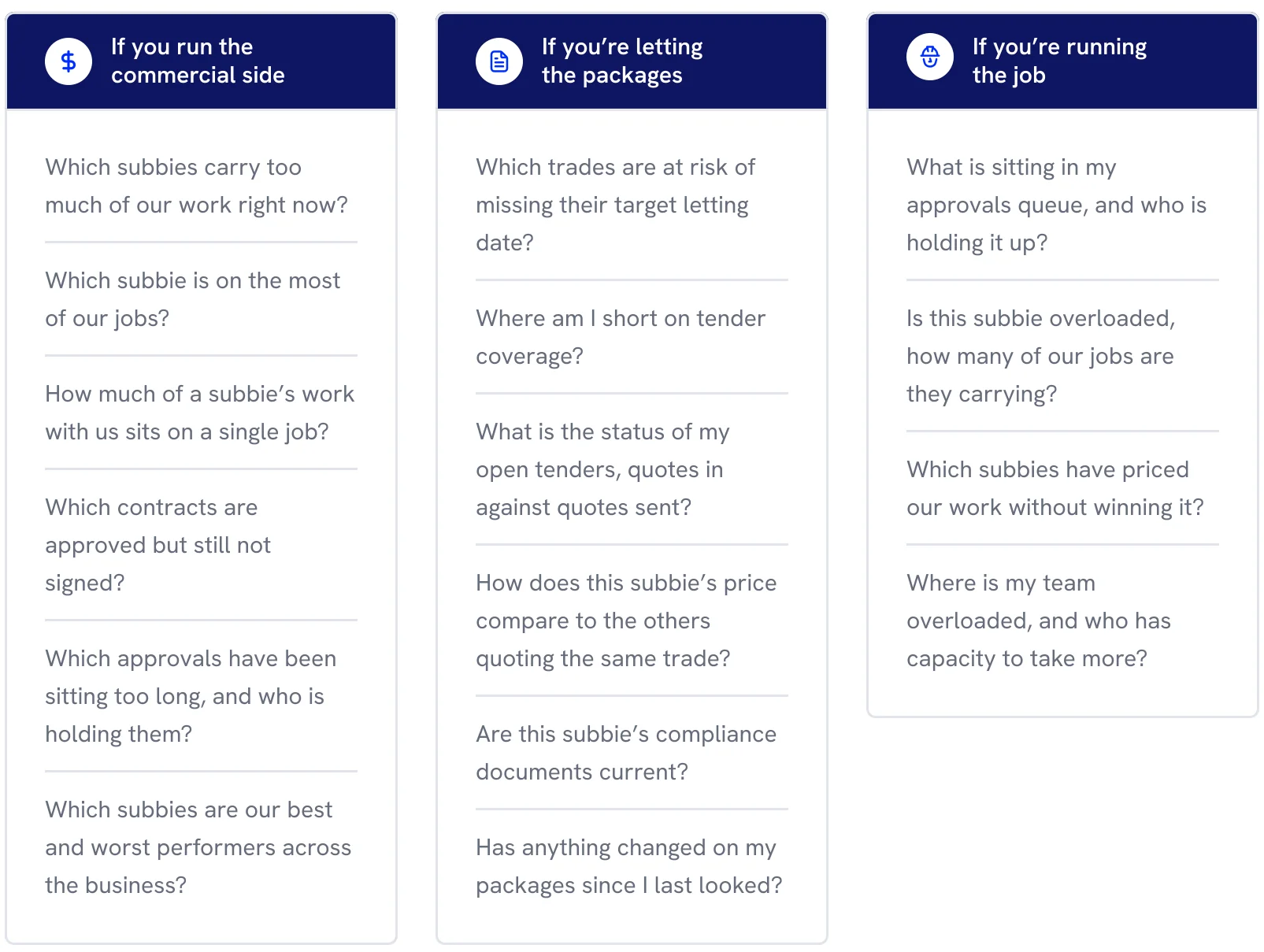
Start with the questions. Our free AI prompt library for main contractors explains what MCP is and gives you the questions worth asking your procurement data, split by whether you run the commercial side, let the packages, or run the job.
Procurement visibility is the problem MCP is downstream of. We recorded a session on the 12 problems of construction procurement and what modernising it actually takes: From Excel to AI: the contractor’s playbook for modernising construction.
Want to see the MCP connector running against real procurement data? Book a live demonstration.

James Metcalfe is a Procurement Specialist and Solutions Expert with a strong foundation in Quantity Surveying (QS).
Having worked extensively as a Quantity Surveyor at Wates Group, he honed his expertise in procurement, vendor management, and cost control while directly contributing to new build projects.
James now applies this wealth of experience as a Solutions Consultant at ProcurePro, where he helps construction teams streamline their procurement processes, reduce costs, and improve project outcomes.
With over a decade of industry experience, James is committed to transforming procurement practices for better efficiency and profitability.
Stay in the loop
Get notified about ProcurePro updates, including new features, integrations and more!